SIMTEQ Newsletter April 2023

Introduction
Events
Product of the month
The art of engineering
New releases
Tips & Training
The SIMTEQ Users’ Conference agenda has been published at https://simteq.co.za/training/conference/ and registrations are open! With less than 3 months to the conference, register now since seats are limited. We're already a quarter of the way through the year, and with that comes a new batch of software releases that are available for download. We've compiled a list of key new features for MaterialCenter, MSC Apex, Adams Modeler, Marc, and Easy5. Our featured product of the month is MSC Apex and this time we focus on its meshing superpowers and why 10 out of 10 users applaud it. Meshing is such a critical step of FEA that being able to do it well is critical and being able to make it effortless is what makes MSC Apex an invaluable tool in your FEA toolbox. If you are an FE analyst, I highly recommend that you spend time to ensure you are familiar with the covered tools to stay on top of your game. In the art of engineering this month, we cover the novel approach of contact-less gears. It is such a "Why didn't I think of that?" moment that it immediately classified as the perfect candidate for our monthly Art of Engineering piece. Just when you think you've seen it all, something as innovative as this comes along. May is also training month at SIMTEQ, if you haven't registered yet to obtain some CPD points and invest in your career. We are looking forward to seeing you and don't forget to register for the Users' Conference!
Regards
Managing Director

SIMTEQ Engineering Users' Conference

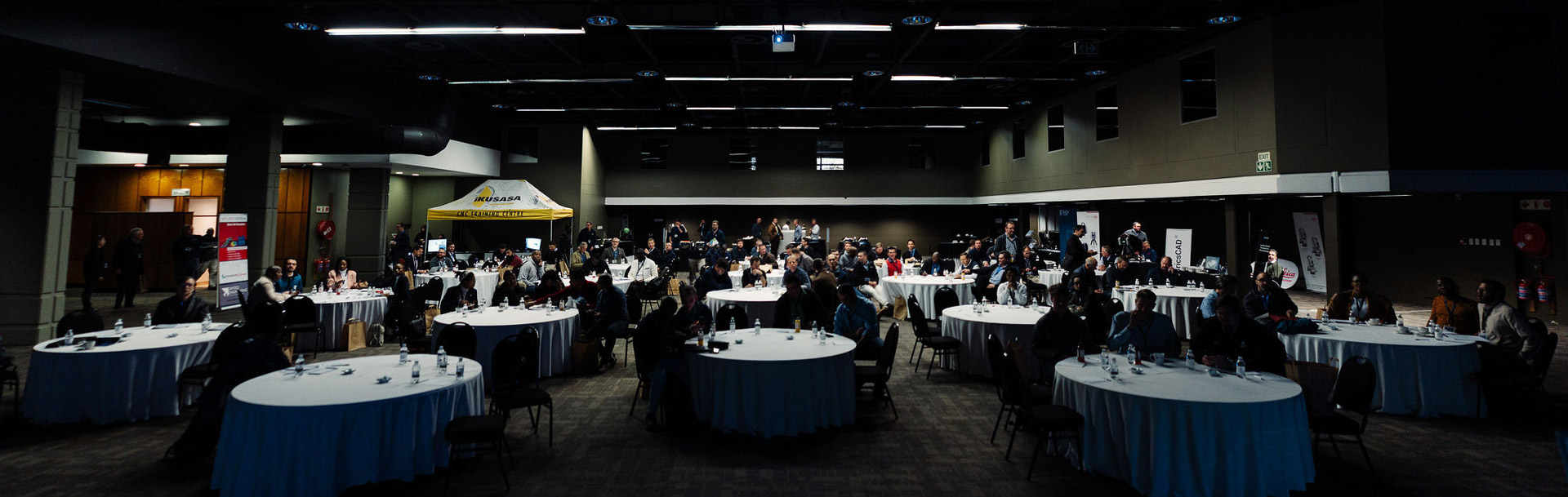
We are thrilled to announce that our SIMTEQ Users' Conference 2023 page is now live! This conference brings together users from all over to connect, learn, and share their experiences using Hexagon's MSC Software. Registration is now open and can be completed online. Don't miss out on this opportunity to connect with fellow users and learn from the best in the industry. Register today and secure your spot at this must-attend event!

When - 27 July 2023
Where - CSIR International Convention Centre

*SEATS LIMITED DUE TO POPULARITY

South African Ballistic Organisation (SABO)

The South African Ballistic Organisation (SABO), will be holding their bi-annual conference this year from 9 - 11 May at the CSIR International Convention Centre. SABO was established in 1993 with two main objectives: to further the science of ballistics and related technologies by exchanging information and bringing together people in the field, and to act as a coordinating organization for all companies involved in ballistics in South Africa. Besides the bi-annual conference, SABO regularly organizes local symposia and workgroups to promote cooperation, communication, and information exchange among ballistic experts and often invites international presenters to these events.

Do you know all MSC Apex’s FE meshing superpowers?

MSC Apex is this month’s product of the month and we focus on its meshing superpowers. Apart from its powerful CAD clean-up capabilities, 10 out of 10 MSC Apex users applaud its powerful meshing capabilities. Meshing is such a critical step of FEA that being able to do it well is critical and being able to make it almost effortless is what makes MSC Apex an invaluable tool in your FEA toolbox. When creating a surface (2D) mesh, the very first option you have is whether you want to create a surface mesh in the usual way, or if you want to use the Incremental Method. To speed up the meshing process, the Incremental Method allows you to preview individual washer meshes before the actual meshing operation with the option to overwrite global feature mesh settings.
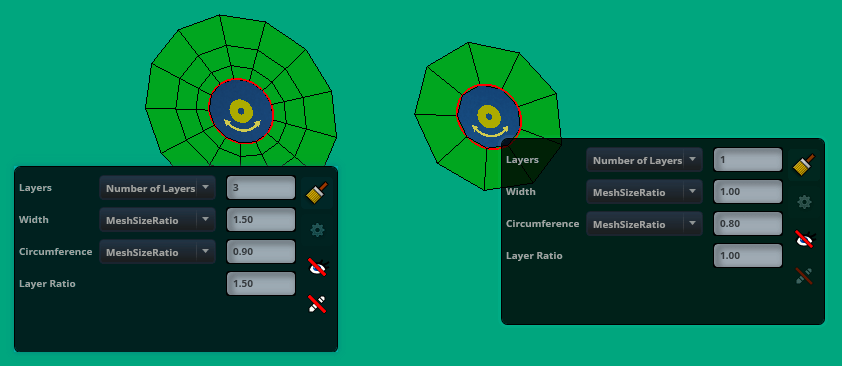
The Incremental Mesh Method provides washer mesh previews and individual mesh editing options.
If the details around holes are not required, holes can also be defeatured (removed) while leaving a mesh seed at its centre for later use (for example to place connections).
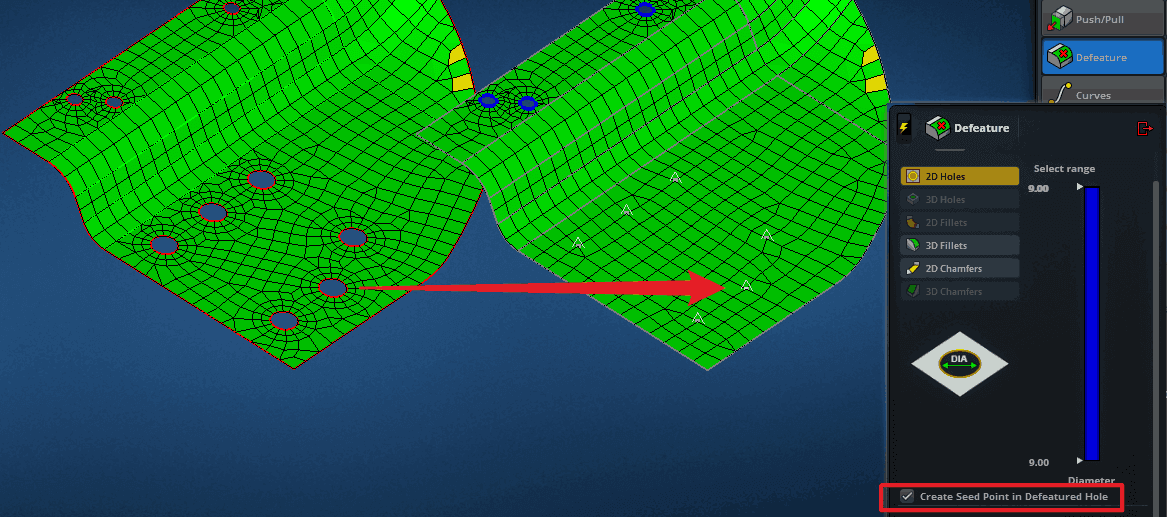
Optional automatic seed point creation during hole defeaturing.
MSC Apex has a host of Feature Mesh Settings which the user can set to apply across the whole model or only selected parts. These settings define how MSC Apex should handle the meshing around certain predefined features. Typical settings include the number or size of elements around features, washer widths, the number of layers etc. and can be set differently for different size ranges of those features.
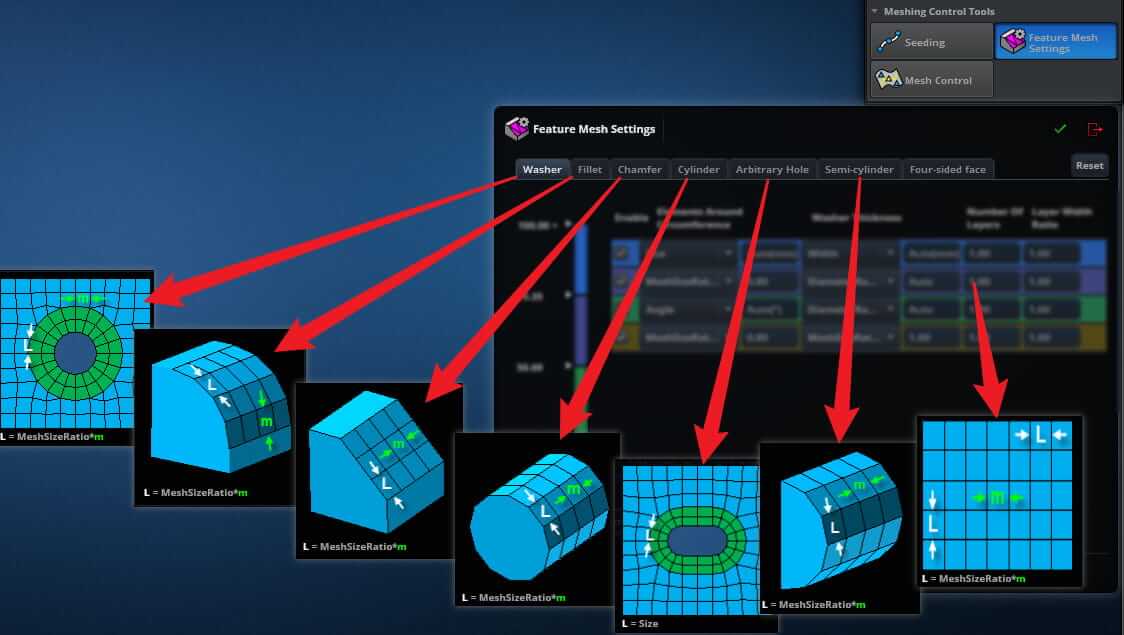
Common feature mesh settings.
Detailed CAD features easily get in the way of a quality mesh, however, that doesn’t need to be the case. Simply suppressing such features allows the mesher to ignore those feature lines while keeping the mesh nodes on the surface. Suppressed features are not deleted and can also be unsuppressed at any stage.
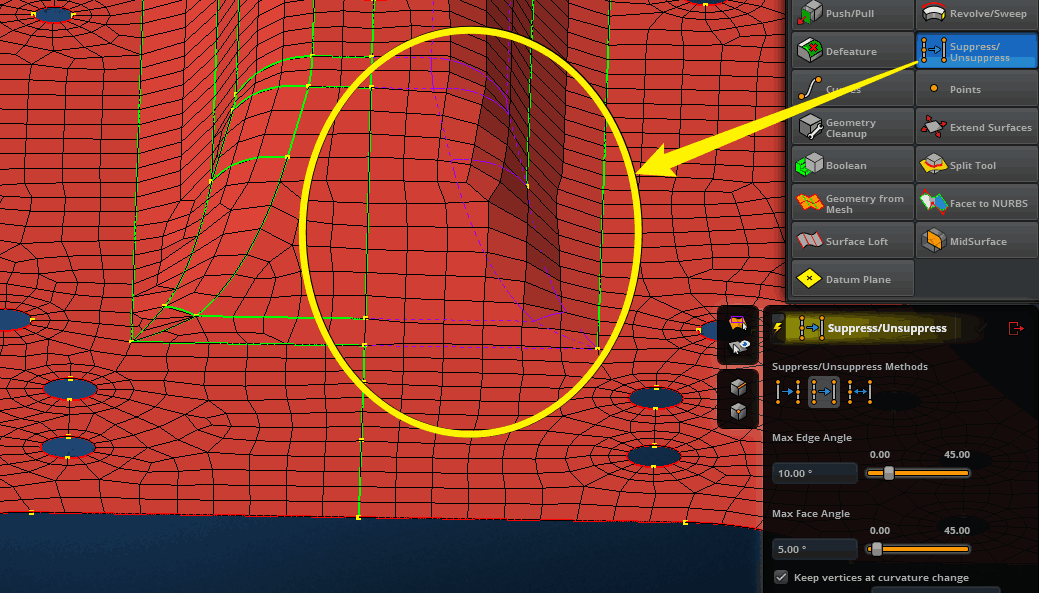
Suppress unneeded feature lines to improve mesh quality
Probably the most underrated meshing feature of MSC Apex is its instantaneous mesh updates when modifying the geometry.
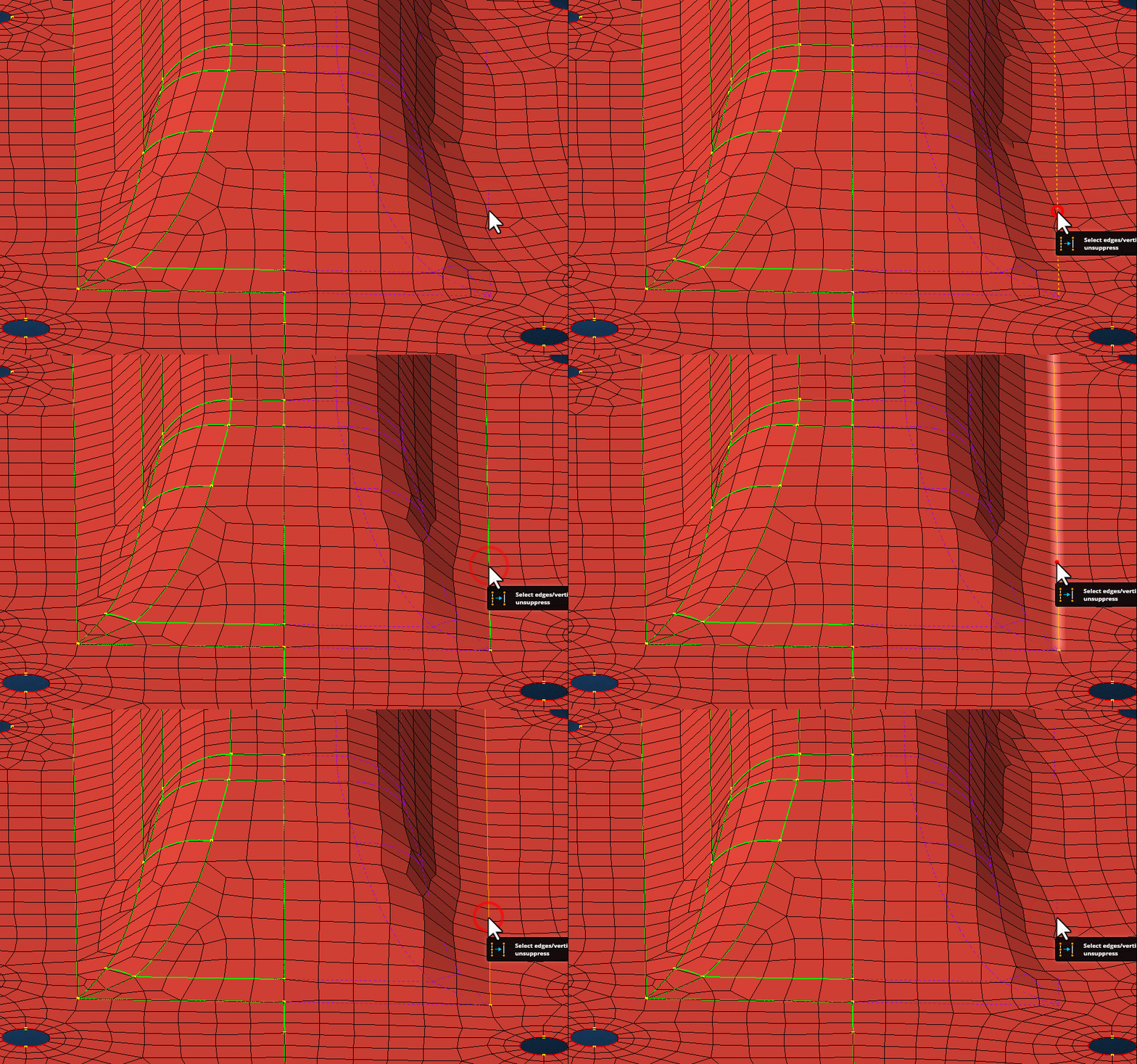
Automatic mesh updates when modifying the geometry
For solid or 3-D meshing two options are available. The first, called Solid Mesh, is the typical tetrahedral mesh, where the solid part is meshed with tet-elements. Naturally, you can choose from first-order (at your own risk) or second-order elements. Another useful, but lesser-known feature of MSC Apex’s solid meshing is its ability to mesh a minimum number of layers for thin sections of a solid. With the Local Layer Adjustment feature you can set the minimum number of layers that should be present through thin sections of a solid, without the need to subdivide the solid or adding mesh seeds.
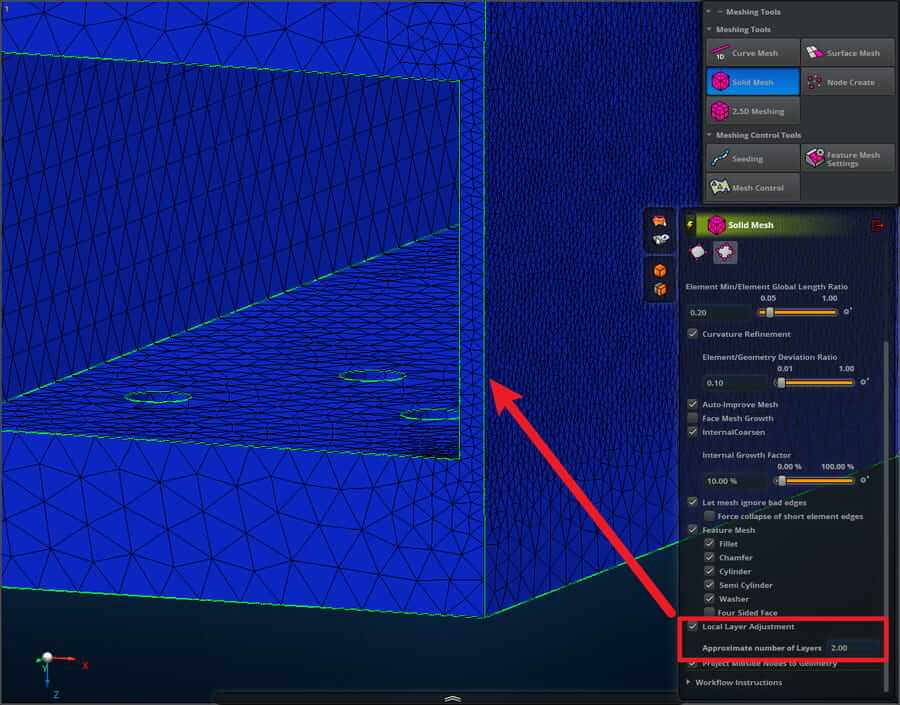
Automatic through-thickness mesh settings
Another impressive feature of MSC Apex is its 2.5D Meshing tool. This option enables the creation of hexagonal elements, even on complex solid bodies. You may ask why it is called 2.5D meshing? Well, that is due to the method that is used to generate the hexagonal mesh. MSC Apex chooses a face to which it applies a 2D mesh and then extrudes (sweep) that mesh into the 3rd dimension, hence 2.5D. Not all shapes are conducive to 2.5D meshing, however, don’t let that dissuade you. MSC Apex has a visual representation of when a part can automatically be 2.5D meshed or not. When a solid body cannot immediately be 2.5D meshed, it appears as red when you are in the tool, or when the visual toggle is selected. But even when a body is red, the mesher can be assisted by subdividing the part into partitions which are hex meshable. When such partitions appear, they turn green to indicate this.
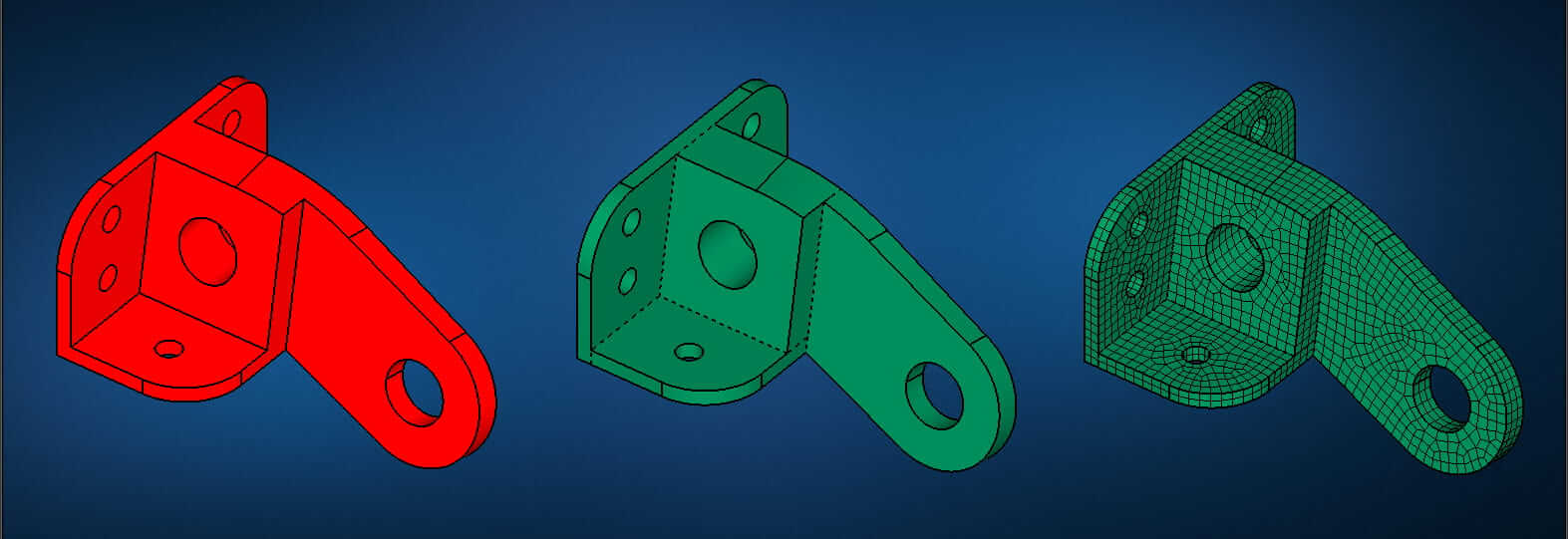
Red = Not automatically hex meshable; Dotted lines: Partition edges; Green: Automatically hex meshable geometry
And when it’s not clear why a solid can’t be hex-meshed, simply choose the “Diagnose Meshability” option to list possible causes why a logical sweep direction is not clear or possible.
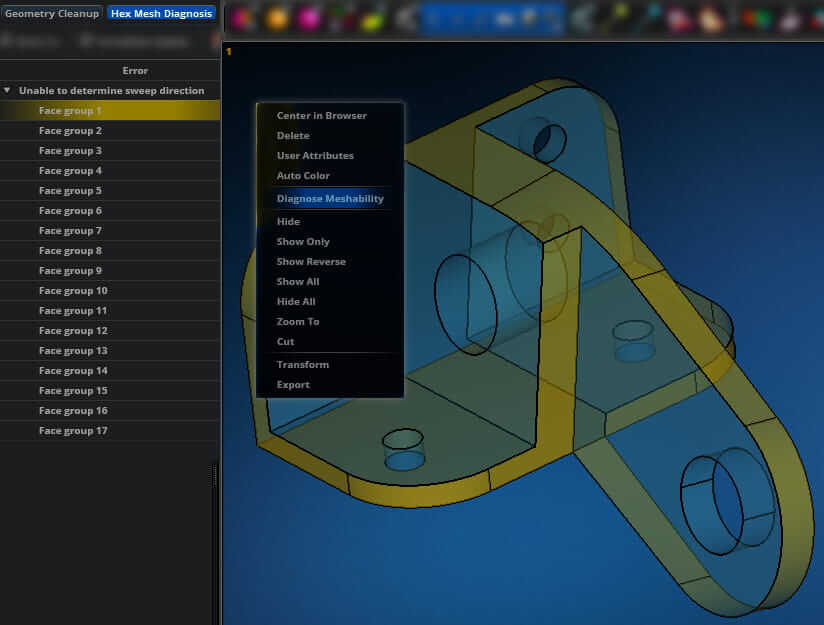
Powerful hex meshable diagnostics tool
To complete the picture, a powerful mesh-quality toolset enables you to find invalid or badly shaped elements as well as their causes. Small geometry features such as short edges, sliver faces or sheet body cracks, which may cause bad-quality elements, can easily be detected and manually or automatically fixed.
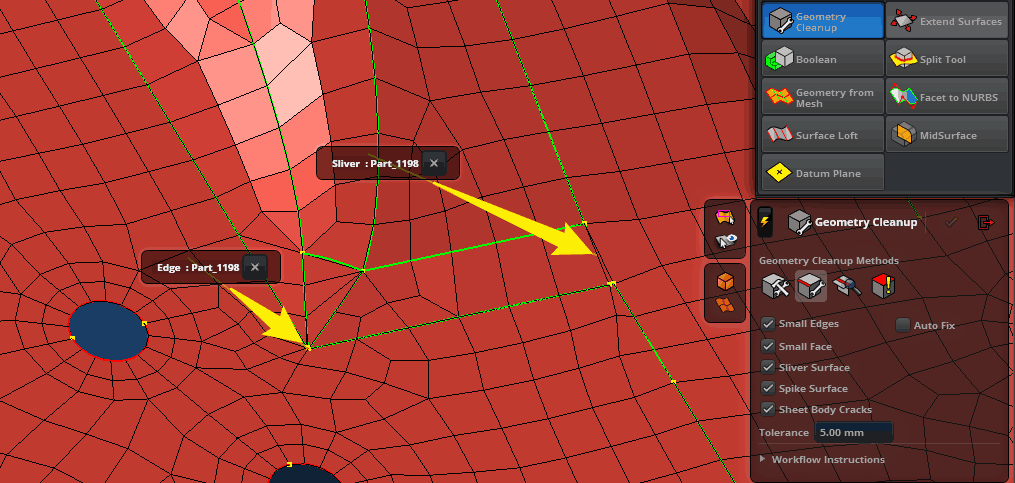
Easily identify and fix small geometric features which may cause mesh defects.
The powerful visual element quality indexes also highlight problem areas and make it easy to find all elements with invalid or bad shapes. This enables you to find and resolve problems before running into error messages when starting an analysis.
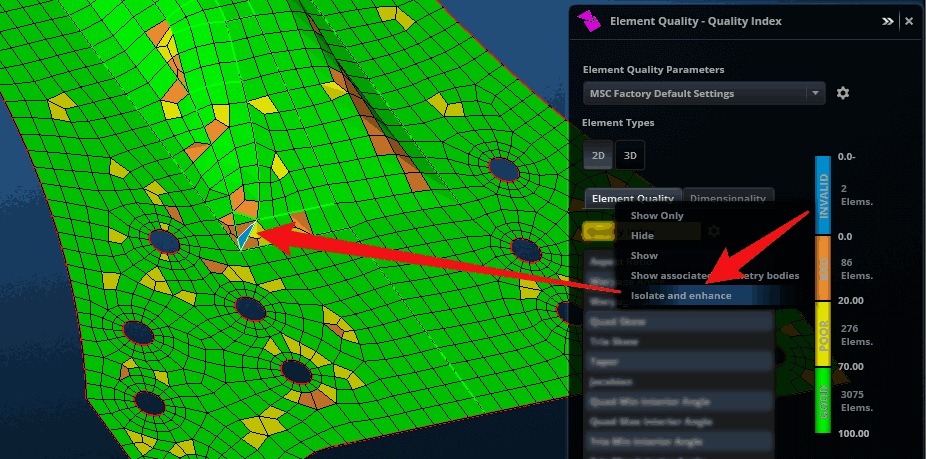
As you can see, MSC Apex’s meshing capability is truly powerful and gives you the power to represent your part as accurately as you choose. Don’t hesitate to contact us to elaborate on these and many more tools in MSC Apex which will make your life as an FE analyst a breeze.

Non-contact Magnetic Gears

As engineers, we are constantly seeking ways to optimize our designs and improve the functionality of our machines. One particular innovation that has recently gained attention is the non-contact magnetic gear.

This technology is a prime example of the art of engineering, as it offers numerous benefits compared to traditional gear systems. The absence of physical contact between the gears results in lower friction, which translates into easier maintenance and longer lifespan. Additionally, the lack of contact means that there is no loss of power and no noise generated during operation.

As we continue to explore new avenues of engineering, the non-contact magnetic gear presents a promising solution for a variety of applications. Its efficient and low-maintenance design showcases the ingenuity and skill of modern engineering.

Adams Modeler 2023.1

Adams Modeler 2023.1 is now available at the Software Download Center.

Click here to learn about What’s New in Adams Modeler 2023.1.

Hexagon Manufacturing Intelligence is pleased to announce Adams Modeler 2023.1. This release provides several new features and improvements including:

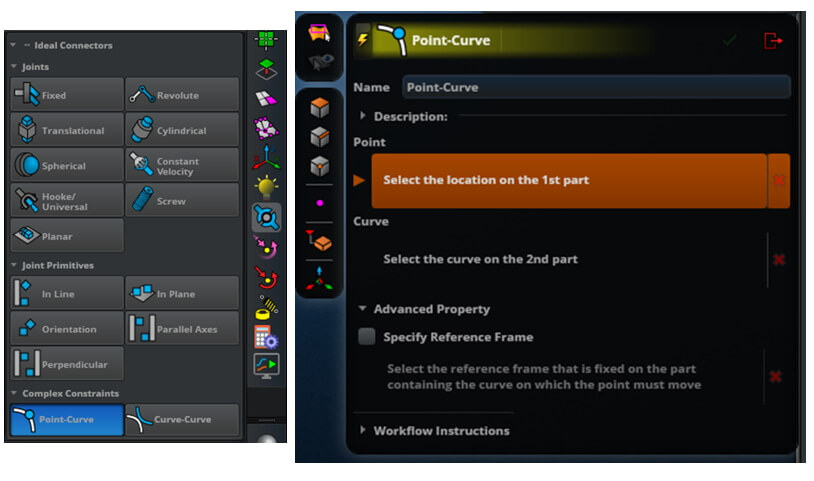
Add Point-Curve Constraint
Native support for creation of point-curve constraint
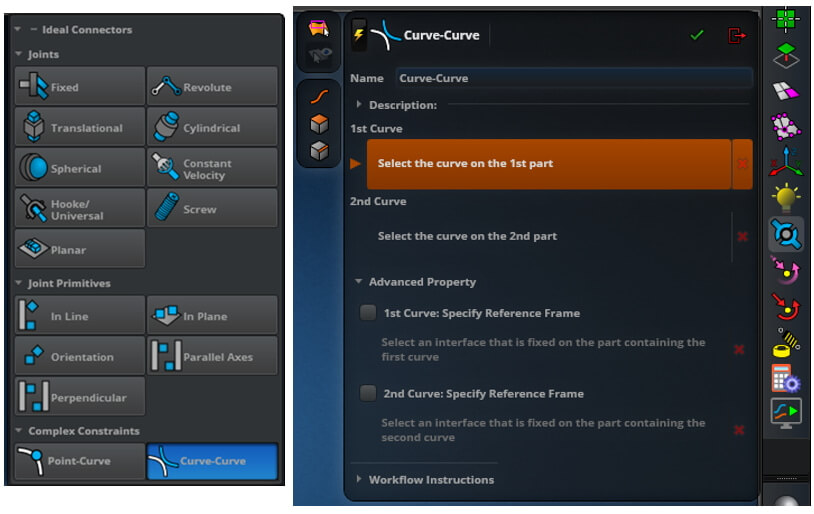
Add Curve-Curve constraint
Native support for creation of curve-curve constraint

Easy5 2023.1

Easy5 2023.1 is now available at the Software Download Center.

Support for Linux GCC (gfortran) to be discontinued

Since Intel OneAPI is now available at no cost to the end user, Easy5 2023.1 will be the final Linux release supporting the Gnu Compiler Collection (GCC) containing gfortran. 

Click here to learn about What’s New in Easy5 2023.1.

Gas Dynamics Library Useability Improvements - For new instances of most non-obsolete components:

  • the local dimension “# of gas species” has been replaced by a global dimension parameter
  • the local configuration parameter “Formulation”, with the choices of “Explicit” and “Implicit”, has been replaced by a global configuration parameter

This will allow you to set these parameters for all the GD library components in your model in one operation, instead of having to set these component-by-component.  To set these parameters for an entire model, select Options > Set Model Global Configuration.  To set these parameters for a submodel, right-click on the submodel icon and select Set Submodel Global Configurations.

Linear Model – The following enhancements have been made to 

  • General Purpose Library component SM (Linear State-Space) can now approximate either continuous or hybrid/discrete models.  Previously it only modeled continuous linear approximations.
  • A new option is available for saving the system matrices calculated by Linear Model Generation, for importing linearized model matrices into the General Purpose library linear analysis components SM, XV, YU and YV.
Marc 2023.1

Marc 2023.1 is now available at the Software Download Center.

Click here to learn about What’s New in Marc 2023.1.

Some main highlights of this release include:

Marc:

  • Support for the hybrid node-to-segment contact method in analyses using the domain decomposition method.
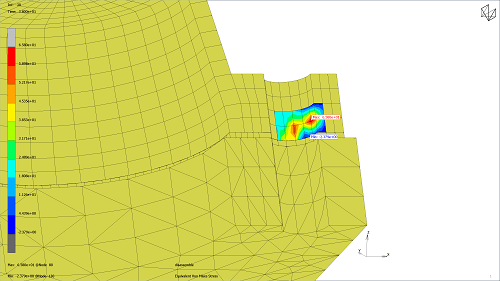
  • New post-processing quantities, Material Forces, and Eshelby Stress tensor that can be used in the study of inhomogeneities.

Mentat:

  • Full support of new Marc functionality
  • New Selective Post option to post-process a subset of the elements and free nodes in the model
  • New option in the design of experiments to export the results, if some experiments have not run to completion
  • Improved support for high-resolution screens
MaterialCenter 2023.1

MaterialCenter 2023.1 is now available on the Software Download Center.

MSC Apex 2023.1

MSC Apex 2023.1 is now available at the Software Download Center.

Click here to learn about What’s New in MSC Apex 2023.1.

Some main highlights of the MSC Apex 2023.1 release include:


MSC Apex 2023.1 is primarily a bug-fix release

  • 160 issues from previous versions of MSC Apex identified and resolved

User Interface and Meshing

  • Shell meshing edge curvature refinement enhancement for facet bodies

MSC Nastran Pre-Processing

  • Support for MSC Nastran PSHELL with an extra layer of abstraction to simplify the user experience
  • The ability to automatically create PSHELL entries when midsurfacing
  • Constant offset and thickness tool

Post-Processing

  • Improved animation performance

Automation and Customization

  • New utilities added
SIMTEQ Engineering Webinar
Contact and Everything That you Need to Know About it
7 October 2022
11:30 - 12:30

Contact and Everything
That you Need to Know About it

Registration
MSC Software Webinars

Cradle CFD Webinar Series

Unleashing Productivity with smart CFD software

Unleashing Productivity with smart CFD software

More Information & Registration

Name: Going the extra mile: Multiphysics and co-simulations with Hexagon

Date and Time: 4 October 2022 10:00-11:00


Name: Get CFD results in real-time and leverage it to systems of system analysis by using Machine Learning Technics

Date and Time: 11 October 2022 10:00-11:00


Name: Using AR to increase immersive knowledge

Date and Time: 18 October 2022 10:00-11:00

Cradle Tip
Cradle is a CFD tool for Engineers, helping you to analyse flow problems as easily as you are used to with FEA. For example, Cradle automatically extracts and meshes the fluid domain, directly from the mechanical CAD model. Just add your flow material and boundary conditions and you are good to go!
Moldex3D Webinars
Gaining Insights to the Black Box of Material Properties
Mar 29, 2023
10:00 AM

Gaining Insights to the Black Box of Material Properties

More Information & Registration
What’s New in Moldex3D 2023
May 10, 2023
10:00 AM

What’s New in Moldex3D 2023

More Information & Registration
Training

MAR101&102 - Nonlinear Analysis using Marc and Mentat (6 Days)

Software Package: Marc and Mentat

Price: R 21 960.00/p excl VAT (A 25% discount applies if attendance is online)

Date: 02 - 17 May 2023

Duration: 6 Days

CPD Accredited: Yes

More Information
Registration

NAS120 - Linear Statics, Normal Modes and Buckling (5 Days)

Software Package: MSC Nastran and Patran

Price: R 18 300.00/p excl VAT (A 25% discount applies if attendance is online)

Date: 22 - 26 May 2023

Duration: 5 Days

CPD Accredited: Yes

More Information
Registration

FEA101 - Finite Element Analysis Fundamentals (5 Days)

Software Package: MSC Apex

Price: R 18 300.00/p excl VAT (A 25% discount applies if attendance is online)

Date: 05 - 09 June 2023

Duration: 5 Days

CPD Accredited: Yes

More Information
Registration

CRA251, 301 - Introduction to scFlow and scStream (3 Days)

Software Package: Adams

Price: R 10 980.00/p excl VAT (A 25% discount applies if attendance is online)

Date: 20 - 22 June 2023

Duration: 3 Days

CPD Accredited: Yes

More Information
Registration
starcrossmenulistchevron-down linkedin facebook pinterest youtube rss twitter instagram facebook-blank rss-blank linkedin-blank pinterest youtube twitter instagram