Simulation Based Design - Lecture 2


Engineering Design Problem: When we design, we would like to:

  • Improve product or process quality
  • Reduce life cycle costs
  • Reduce development lead times

This can happen during the initial design phase or sometime during the product's life.

The design process starts by generating ideas – the functional performance of these ideas has to be verified.


There are two ways to verify an idea's functional performance:

  • Physical testing of a prototype, the final product or process.
  • Prediction of the performance of the product or process.

When to measure and when to simulate?
What is the best choice?  Generally, the answer depends on the system, its behaviour, and the required results.

As a general guideline: Simulate what is easy to simulate and measure what is easy to measure!


Generally, it is better to simulate when:

  • Evaluating concepts - before prototypes - are available.
  • Many different or very long load cases have to be evaluated.
  • Required outputs are difficult or impossible to obtain.
  • Measurement will be very expensive (landmine tests).

Simulation Can Assist During:

Initial product development (no product or prototype is available)
Allows the designer to:

  • Make well-founded decisions early in the product development process.
  • Test more ideas in less time.
  • Understand how product behaviour is affected by different factors.
  • Discover unexpected behaviour.
  • Be sure the product fulfils demands.

Continual product Improvement (prototype or product is available)

  • Optimise design solutions for the next product generation.
  • Estimate product sensitivity to changes in, e.g., weather, wear, and ageing.
  • Test dangerous situations.
  • Understand product behaviour and factors that affect the behaviour at controlled repeated conditions.

Analysis Paralysis?

Model definition might be, according to Neelamkavil, "A model is a simplified representation of a system (or process or theory) intended to enhance our ability to understand, predict, and possibly control the behaviour of the system."


For testing or simulation, one of two approaches can be taken:

  • Trial and error
    • This method is not well defined and can continue forever without providing any indication as to how close the design is to an optimal value.
  • Testing programme, e.g., DOE study
    • More structured approach that gives the designer much more insight into how the design behaves.

MBD Simulation Methodology

  1. Problem formulation
  2. Definition of idealized model
  3. Development of a computer model
  4. Formulation of system equations
  5. Equation solving
  6. Results and post-processing
  7. Evaluation and conclusion

1. Simulation Methodology: Problem formulation, describe:

  • Technical problem to be solved
  • Physical effects to include
  • Limitations of the system
  • System components
  • Targets to achieve (force, torque, displacement..)

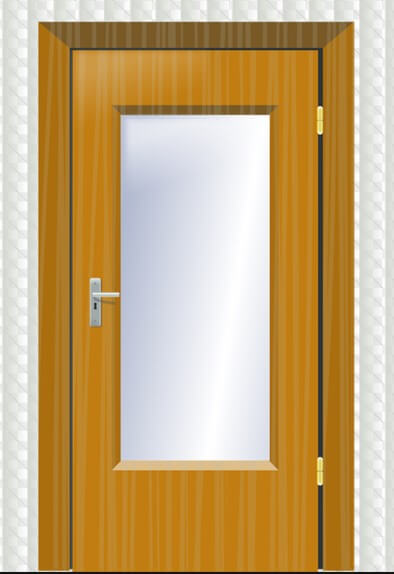
Door

Design Example

  1. Load cases
  2. Bodies
  3. Inverse Dynamics
    • Ideal constraints
  4. Robust design
    • Model flexibility
  5. Forward Dynamics
  6. Model improvements
    • Door damper/closer
    • Automation

Design door

  • Size: 0.6x2.0x0.04 (from ergonomic data)
  • It must be comfortably operated by a standard human (see later for human force values).
  • The door mechanism must be designed for infinite life.
  • Design must be robust, e.g., not fail under limit manufacturing tolerances for automation.

Door V2

  • Optimise door design
  • Door add-ons
    • Damper
    • Opening mechanism

1. Design Example: Load Cases

  • Own mass
  • Opening Forces
  • Extra accessories
  • Manufacturing tolerances
  • Misuse cases

door loadcases


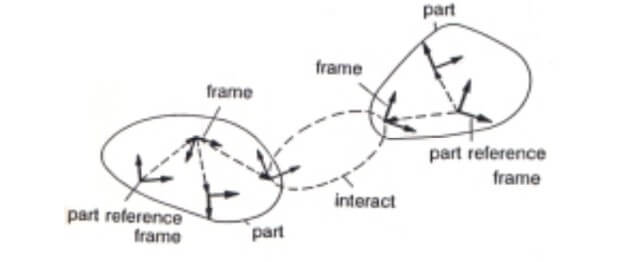
2. MBD Simulation Methodology: Definition of idealised model

Collect relevant system data:

  • Parts
  • Component couplings (interactions between parts)

Model parameters

  • Mass, centres of gyration, damping, stiffness

Figure 6: Idealized Model


3. MBD Simulation Methodology: Development of a computer model driven by:

  • Access to information
  • Required results and accuracy
  • Allowed simplifications
  • Available resources (time and money)
  • Model complexity
    • Static, quasi-static, Dynamic
    • 1D, 2D or 3D computer model
  • Available modelling methods
    • Gravity
    • Rigid bodies
    • Ideal joints
    • Stiffness elements
    • Damping elements
    • General force components
    • Contact
    • Advanced elements (tyres, flexible bodies, ...).

Creating models in Adams/View


Location and Orientation

  1. Points (Parametric): Location only
  2. Markers: Location and orientation

Figure 7: Location and Orientation


Specifying Location and Orientation in Adams

Figure 8: Specify location and orientation

  • Location: specify in global or local coordinates
  • Orientation: specify in global or local coordinates
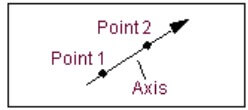
    • Along Axis: Z-axis along the line of two points, arbitrary rotation.
    • In a plane: the Z-axis is along the line of the first two points; the third point locates the ZX-plane.

Figure 10: In plane

Figure 9: Along axis


2. Design Example: Bodies

Figure 11: Clock pendulumPart vs Geometry

  • Good for concept evaluation
      • Pendulum with out link

  • Next step after acceptable results create CAD
      • Pendulum with link


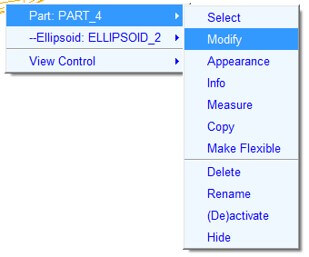
Parts In AdamsFigure 13: Modify part

  • All parts (except the ground part) have:
    • Initial position and orientation
    • Part mass & inertia
      • Mass and inertia reference
    • Initial velocities
    • Degrees of freedom
      • Governed by the laws of mechanics

Figure 12: Modify body


Moment of Inertia Experiment

Participants:Picture1

  • Blue -> Solid Cylinder
  • Green -> Hollow cylinder
  • Brown -> Solid Sphere
  • Red -> Hollow Sphere
  • The rolling radius of all participants is equal
  • Mass for all participants is equal
  • All participants roll without slipping

Constraints
Constraint equations in Adams

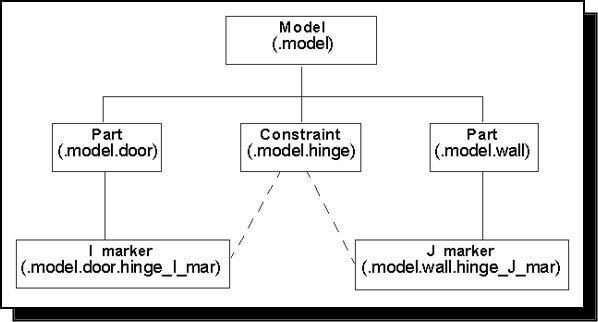
  • Constraints are represented as algebraic equations in Adams/Solver.
  • These equations describe the relationship between two markers.
  • Joint parameters, referred to as I and J markers, define the location, orientation, and connecting parts:
    • The first marker, I, is fixed to the first part.
    • The second marker, J, is fixed to the second part.

Figure 14: Constraints

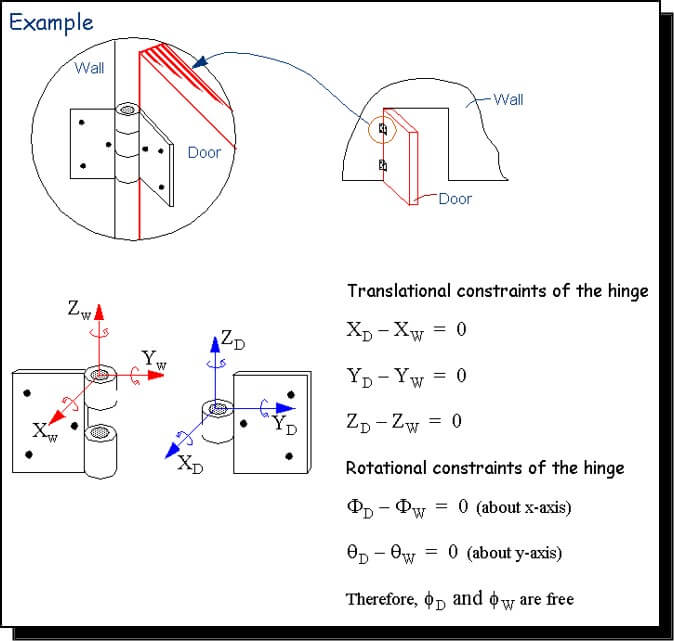
Figure 15: Constraint example


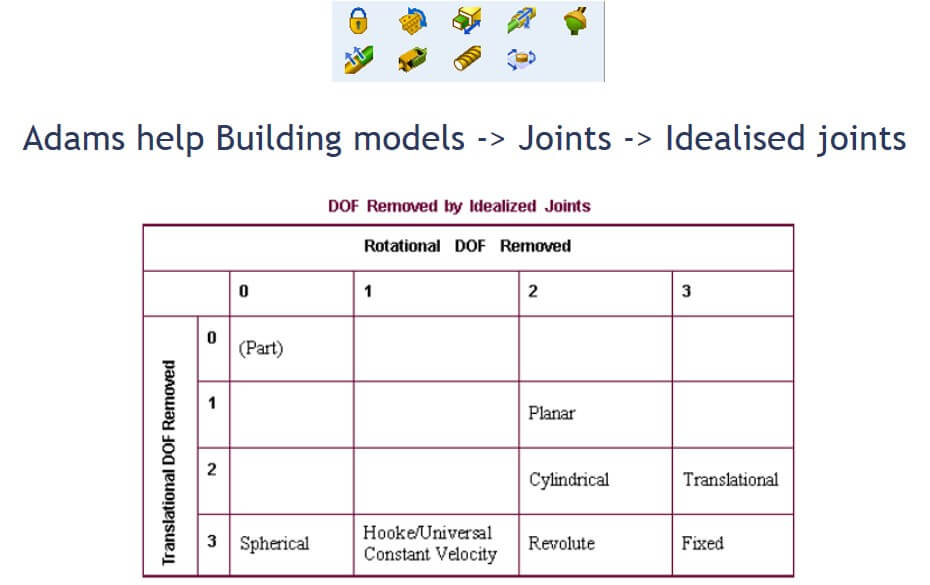
Ideal Constraints in Adams

Figure 15b: Ideal constraints


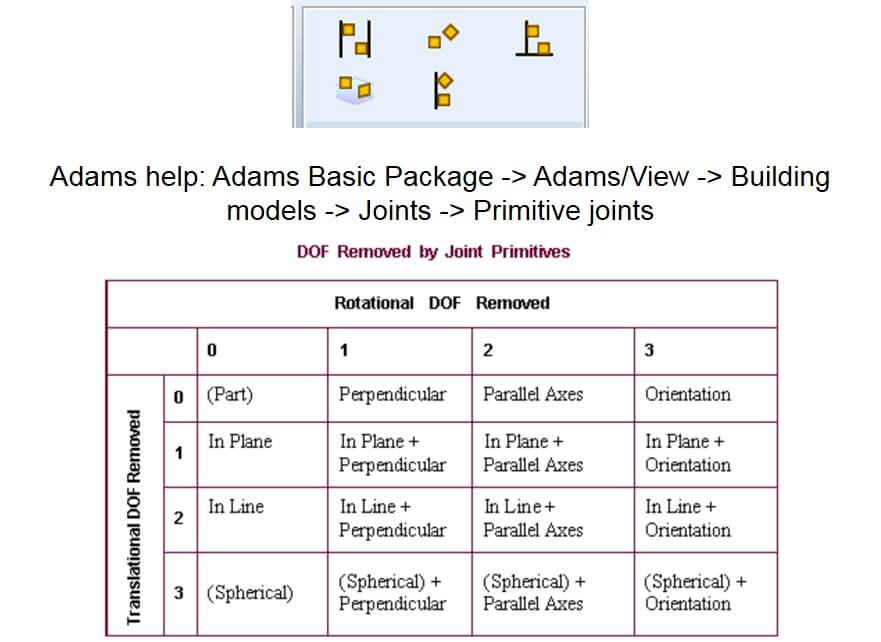
Joint Primitives in Adams

Figure 16: Joint primitives


5. MBD Simulation Methodology: Equation solving

  • Parameters:
  • Solver type
    • Stiff methods (Implicit backwards difference formulations)
    • Non-stiff methods (explicit forward difference formulations)
  • Step size
  • Error
  • Simulation duration

6. MBD Simulation Methodology: Results and post-processing

  • Problem dependent
  • Available tools
    • Time domain plots
    • Frequency domain plots
    • Animations
    • Data export

3. Design Example: Inverse Dynamics

Solve kinematic equations, but calculate the forces required to do so.
Use motions

  • Joint motion
  • Point motion

Measures: Your Virtual Instrumentation

  • Predefined measures
    • Object
    • Point-to-Point
    • Included angle
    • Orientation
    • Range
  • User-defined
    • Adams/view Computed
    • Adams/Solver function

Figure 18: Measure


7. MBD Simulation Methodology: Evaluation and conclusion

Compare system behaviour with the initial problem formulation

  • Problem solved: continue to the next step in the development process
  • Problem not solved: Find what is wrong, update and iterate the MBS procedure.
    • Unsatisfactory design
    • The model does not exhibit the required behaviour

Evaluate the certainty of results

  • Assumptions
  • Numerical approximation

Results Discussion

  • Measures in local coordinate systems
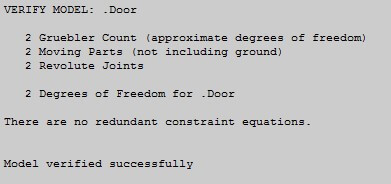
  • Redundant constraints: BAD! Why?
    • Indeterminate structure
    • Alternate constraint configuration

Figure 19: Results


4. Design Example: Robust Design

  • Manufacturing tolerance simulation
    Rotate hinge 0.1 deg.

Figure 20: Robust design


Forces

  • Forces for physicists:14431850
    • Gravitation
    • Weak force
    • Strong force
    • Electromagnetic force
  • Forces for engineers:
    • Body forces
      • Gravity
      • Electromagnetic forces
    • Aerodynamic forces
      • Buoyancy
      • Lift
      • Drag
      • Thrust
    • Contact or normal forces
    • Friction forces
    • Damping forces
    • Compliant forces (elastic)
    • Applied forces (push, pull, torque)
    • Fictitious forces
      • Coriolis force
      • Centrifugal force

Bushing

Adds linear flexibility

Figure 21: Bushing


Flexibility: Where should the flexibility be added?

Figure 22: Flexibility


Results

Figure 23: Results


Picture24


Discussion

  • The model is not overconstrained anymore.
  • Forces increase with increasing angle of the bottom joint.
  • Forces increase when the distance between joints reduces, but the effect of tolerance reduces?

Figure 25: Discussion


5. Design Example: Forward Dynamics

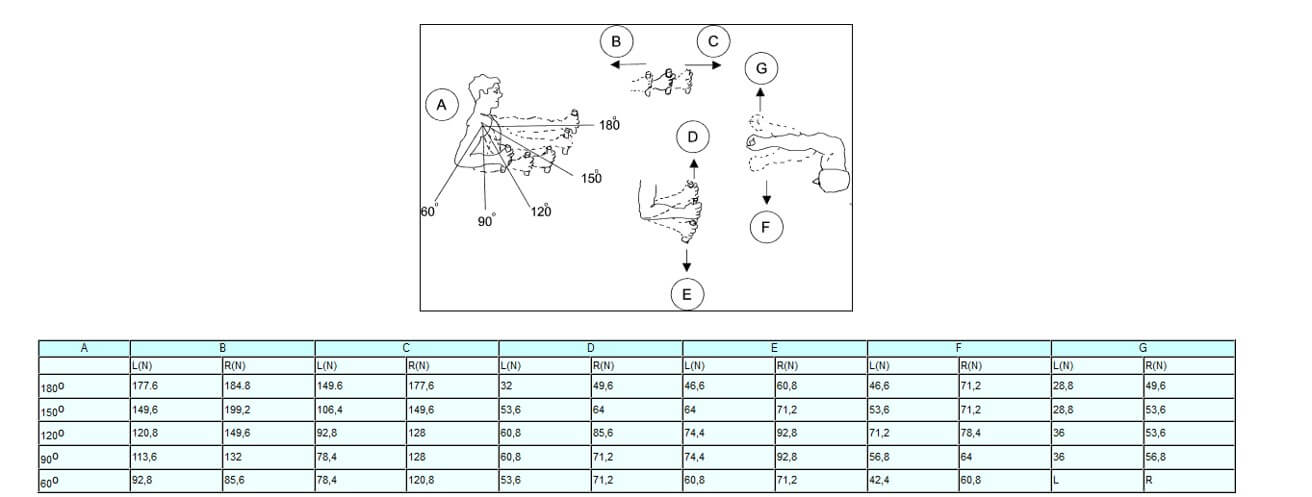
Can a human open the door?

Figure 26: Human forces to open door


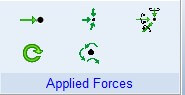
Applied Forces:

Figure 27: Applied forces

Figure 27: Applied forces

  • Single Component Force
  • Single Component Torque
  • Torque Vector
  • Force Vector
  • General Force

Must select components, run time direction, and action and reaction bodies.


6. Design Example: Model Improvements

  • Improve constraint model
    • Add play
    • Torque vs axial reaction forces
  • Add a way of stopping the door when it is open and closed
    • Sensor
    • Stop torque
    • Point to plane contact
  • Load prediction for finite element calculation
  • Add a door damper to automatically close the door.

Back to Lecture Index

Knowledge is power!

If you like knowing what is new in simulation technology, you're at the right place. Register for our monthly newsletter here:

Don't ever risk your career by using cracked software!

THE EXCUSES:
I only used it for my studies, I only wanted to evaluate the software, I didn't use if for commercial purposes, I only installed it, but never used it... Unfortunately, no reason holds up in court for the possession of stolen goods.

THE FINE?
The full commercial purchase price of the software (for everything you had access to, whether or not it was even used!) 

Students (under- or post-graduate) also has no recourse since they can get access to free legal student versions, or the full commercial versions through their respective universities.
If you wish to evaluate any software or module that you do not have access to, please contact us, we will gladly arrange for evaluation licenses, even emergency licenses. 

There is just no reason to access illegal software.
crossmenulist linkedin facebook pinterest youtube rss twitter instagram facebook-blank rss-blank linkedin-blank pinterest youtube twitter instagram