Using the MSC Software Solutions download centre, you can have access to the latest releases of your MSC Software packages by simply downloading the installation files.
Once you have finalised the purchase order for the first time, an account will be automatically created for the electronic delivery administrator, who will then have administrative rights to the solutions download centre. The administrator will be able to create an account for any other person who requires access to the Solutions download centre. The administrator can also give administrative rights to another member if it is required.
If the Solutions download centre cannot be accessed due to there being no administrator, in the case where the administrator is no longer available, or simply due to lost login details, you can obtain new login details by going to the login page of the Solutions download centre.
There, you will be able to get help by choosing one of the following options, as shown in Figure 1:
- Password finder
- Registration page
- Customer support
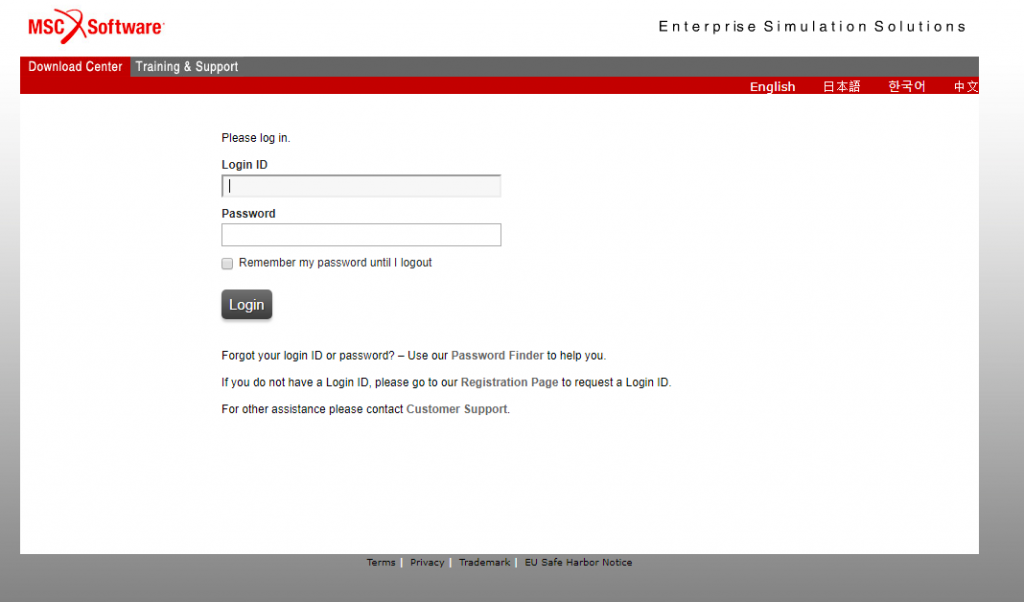
Figure 1: Download Centre Login
Once you have access to the Solutions download centre, you can start selecting and downloading the products which you are licensed for. When using the download centre, there are three sections on the page, which are shown in Figure 2. The three sections are:
- Software
- Administration
- Information
Software
From here, you can find the installation files and documentation for the software packages that you want to download by either looking for the products under the Product List or performing a search.
Administration
Here you can control your account settings, such as login details and download preferences, as well as view account members. Here, the administrator can control the members and their rights.
Information
For further help on using the Download Centre, the user manual and other tools can be found here. The user manual provides information on using all of the features of the download centre, including downloading software and performing administrator tasks.

Figure 2: Sections of the Download Centre
To download a software package from the available list, select 'Product List' and select the package you would like to download.
- Under the description, select the file that you want to download. Some older versions of the software package can be found under Prior Releases.
- To download a file, select the downward-facing arrow to the right of the file name. This will start a download in your browser using the default settings.
- For more download options, such as downloading via FTP or splitting the download file, expand the file by selecting the plus to the left of the file name and select the Advanced Download Options. A new window will open, which explains how to use the alternative download options as well as gives the required details for the download.

Figure 3: Downloading the installation files.
By following these easy steps on the MSC Software solution download centre, you can ensure that you always have access to the latest releases of your MSC Software packages.